
Magic mirrors in 2026: the technologies behind an interactive mirror
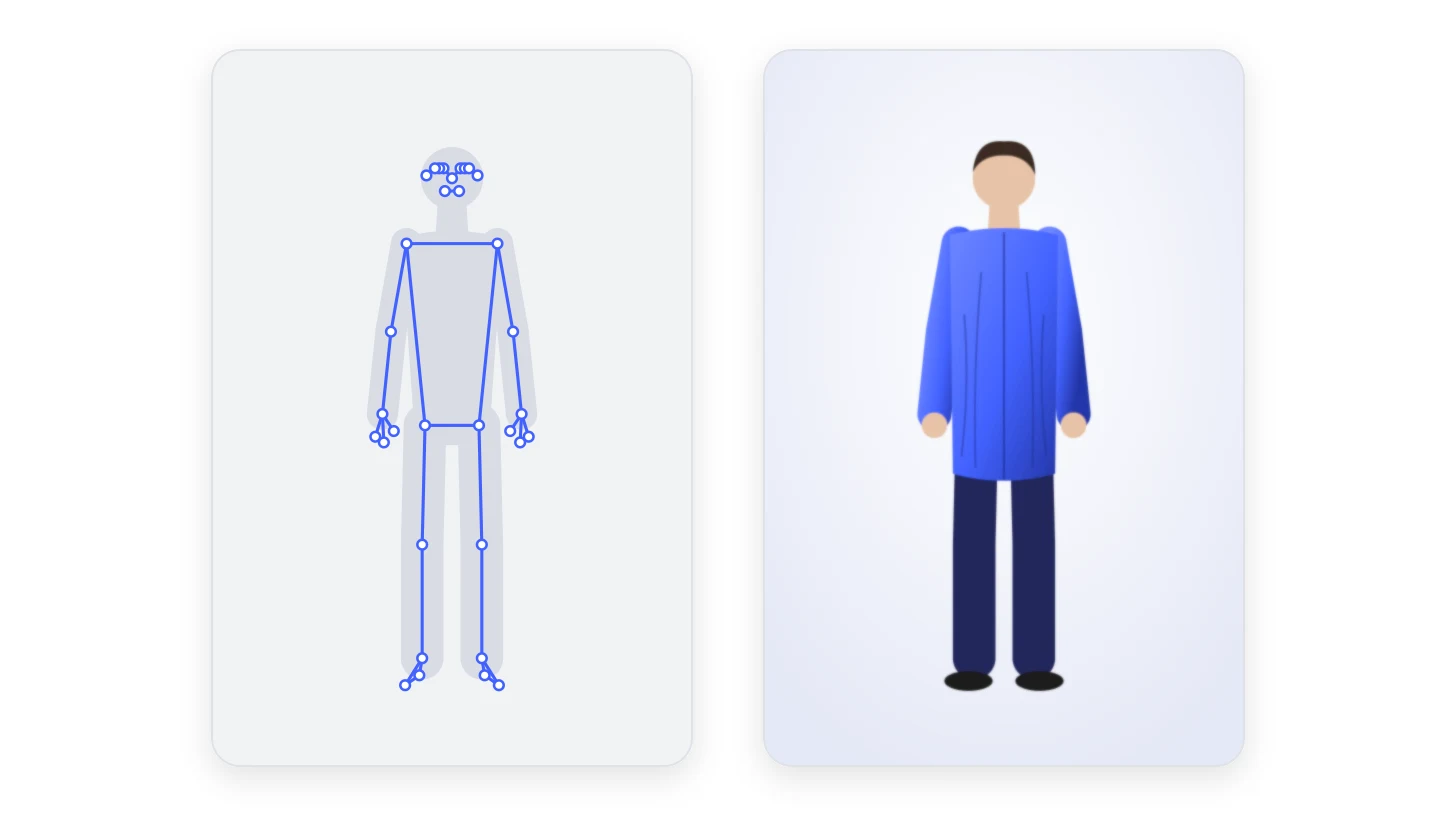
A magic mirror stops people who were walking past. They see themselves, then themselves in something else: a superhero costume in a clothing store, a 1950s postman’s uniform in a museum, a lab coat on a pharmaceutical stand. They stay, try another look, and leave with a photo or a clip that their friends will see. For a brand, that is dwell time, a product actually tried, and content shared by the visitors themselves.
Under the frame, there are always four things: a screen, a camera, a computer and software that understands a body. What changes from one mirror to the next is that software, and above all how it dresses the visitor. In 2026 there are two families: augmented reality, which places a 3D garment on a skeleton it tracks, and generative AI, which redraws the image of the visitor. This article goes through each layer, then helps you choose.
The hardware: a screen, a camera, a computer
Real mirror or video mirror. Two designs share the name. The first puts a two-way mirror, a semi-silvered glass, in front of a screen: where the screen is black, the glass reflects like an ordinary mirror; where it lights up, the image shows through. That glass lets only part of the light through: 20% for Pilkington’s standard MirroView, 49% for its 50/50 version designed for shops, so the screen behind it runs at full brightness. The second has no mirror at all: a camera films the visitor and the screen shows the image flipped left to right, as a mirror would. The first looks magical when only a few elements appear around a real reflection. But a real reflection can never be redrawn: to put a garment on the visitor, the image of the visitor has to come from the camera. That is why try-on mirrors, ARGO’s included, are video mirrors.
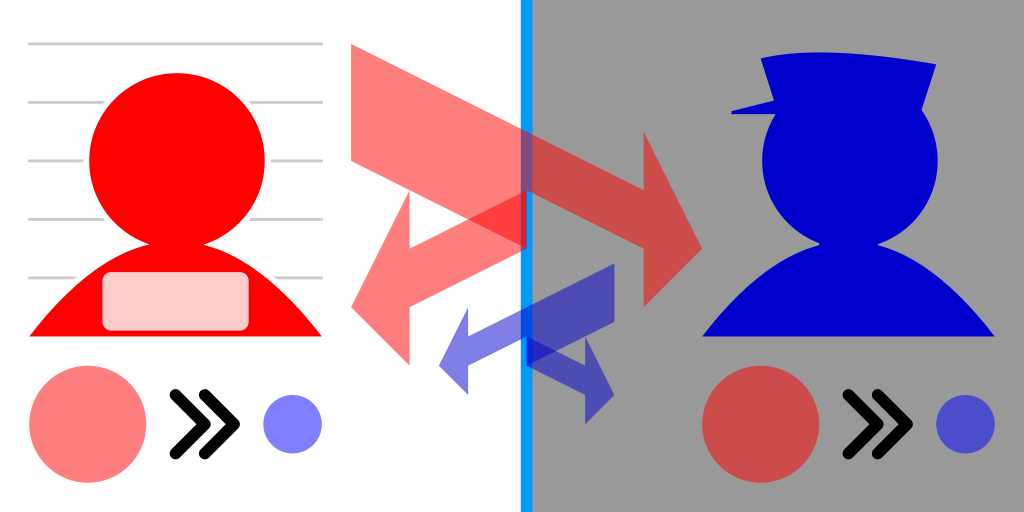
How a two-way mirror works: both sides mainly see the brighter one. Behind a mirror display, the screen is the bright side wherever it lights up.
Image: Cmglee, CC BY-SA 4.0, via Wikimedia Commons (rasterised, converted to WebP).The screen. A large portrait display, so that an adult fits from head to toe, in an enclosure that hides the cables, the computer and the camera. Brightness matters more than resolution in a shopping mall full of daylight.
The camera. A standard RGB camera is enough for most uses today: the AI models of the next section estimate the skeleton from an ordinary image. What counts is the field of view (seeing a whole body at two or three metres), the height it is mounted at, and the light: a backlit visitor in front of a shop window is the classic trap. Some mirrors add a depth camera, which measures distance for every pixel; we come back to it below.
The computer. A small PC with a graphics chip inside the enclosure. It runs either a native application (Unity, Unreal) or, increasingly, a web browser in full screen: the camera, the AI models and the 3D rendering all run in the page, through WebGL or WebGPU. Updating an experience then means publishing a web page, not reinstalling software.
Around it: a touch layer or none at all (a mirror driven by gestures needs no glass to clean), a printer for souvenir photos, and a network connection to deliver content and the QR code that lets visitors keep their picture.
Detecting the visitor
Before dressing anyone, the mirror has to know someone is there. The simplest method compares each image with the previous one: when enough pixels change, someone is moving in front of the screen. It costs almost nothing and wakes the mirror from its attract loop, the video that plays to catch the eye. Finer detectors find a person or a face, which helps tell a visitor facing the mirror from someone walking past behind them.
Understanding the body
This is where a magic mirror is really made. To put a sleeve on an arm, the software has to know where the arm is, in every frame.
Pose estimation from a standard camera
A pose estimation model takes an image and returns the position of the body’s joints, the keypoints. Two layouts dominate. The first, the 17 points of the COCO dataset, used by Google’s MoveNet (2021), has 17 keypoints: nose, eyes, ears, shoulders, elbows, wrists, hips, knees, ankles. The second, BlazePose, the model behind MediaPipe’s Pose Landmarker, returns 33 landmarks: it adds the hands, the feet and more of the face, and also gives each point in 3D world coordinates. The research reference that made the field popular, OpenPose, was published by Carnegie Mellon University in 2017; its licence restricts it to non-commercial research.
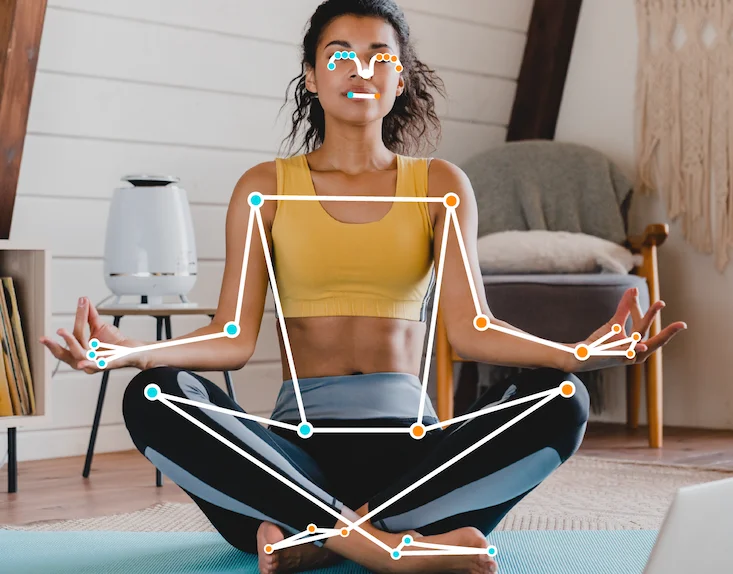
MediaPipe’s Pose Landmarker on an ordinary photo: each dot is a landmark, each line joins two of them.
Image: Google, CC BY 4.0, via Wikimedia Commons (converted to WebP).These models run in real time on a modest graphics chip, and in a web browser: MediaPipe ships them for the web, executed on the GPU. That is what lets a magic mirror work with an ordinary webcam and a web page.
Google shows MediaPipe’s Pose Landmarker running in a web page: the 33 landmarks, in real time, from a webcam.
Video: Google for Developers, on YouTube.What the camera sees
- 17 keypoints
- The classic body skeleton, in the COCO layout that MoveNet uses: nose, eyes, ears, shoulders, elbows, wrists, hips, knees and ankles.
- Lets the mirror do: pinning a 2D or 3D garment to the torso and limbs, gesture games, knowing how many people stand in front of the mirror.
- 33 landmarks
- BlazePose, in MediaPipe, adds the hands (thumb, index, little finger), the feet (heel, toes) and more points on the face, and gives every point a depth estimate.
- Lets the mirror do: sleeves that follow the wrists, trousers and shoes that sit on the feet, a garment that turns with the body.
- Person mask
- Segmentation labels every pixel of the image: person or background.
- Lets the mirror do: swapping the background for a brand universe, and hiding the parts of a garment that pass behind an arm or the hair.
- Face mesh
- A dense mesh of the face: MediaPipe Face Landmarker returns 478 points in 3D. Only a sample is drawn here.
- Lets the mirror do: glasses, make-up, hats and masks that stay in place when the head turns.
A standing mannequin and four readings a magic mirror can take of it: 17 body keypoints; 33 body landmarks including hands and feet; a person mask that separates the body from the background; a face mesh. Each reading lists what it lets the mirror do.
Each reading of the image unlocks a different kind of experience. The coordinates are drawn by hand; the point lists follow MoveNet (17) and BlazePose (33).
Depth cameras
A depth camera measures, for every pixel, the distance to the scene. Microsoft’s Kinect made it famous; its last version, Azure Kinect, came with a body-tracking kit that returned a 3D skeleton. Microsoft ended its production in August 2023 and handed the technology to Orbbec, whose Femto Bolt uses the same depth module and can run Microsoft’s body-tracking software through a compatibility layer. The RealSense cameras play a similar role; Intel spun them off as an independent company in July 2025.
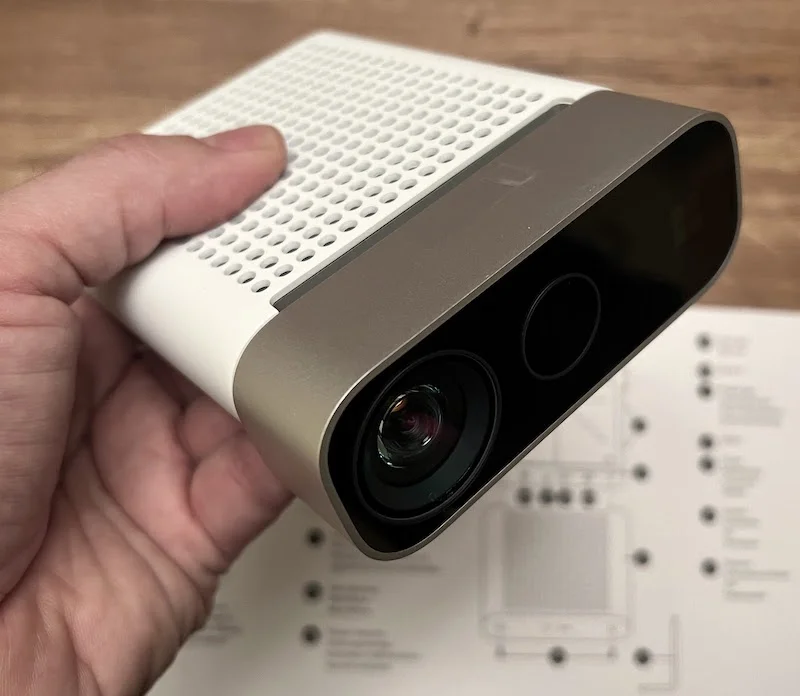
The Azure Kinect DK, Microsoft’s depth camera with its body-tracking software, produced until 2023.
Image: Profkipp, CC BY-SA 4.0, via Wikimedia Commons (converted to WebP).Depth makes tracking sturdier: it separates two people who overlap, copes better with poor light, and knows exactly what is in front of what. The cost: specific hardware, drivers, and in practice a native application. For a mirror that travels from event to event, a standard camera and a browser are simpler to deploy and to maintain.
Orbbec’s Femto cameras running the samples written for the Azure Kinect: the skeleton comes from the depth sensor.
Video: Orbbec, on YouTube.Masks, faces, hands and body shape
Three other readings complete the skeleton. Segmentation cuts the person out from the background, pixel by pixel: it is what lets a photobooth replace the background with a brand universe, and a garment pass behind an arm. The face mesh places hundreds of points on the face for glasses, make-up or a hat. Hand tracking follows the fingers, for gestures or a ring. And research goes further: parametric body models such as SMPL describe the whole 3D shape of a body with a few parameters, which opens the way to garments that fit the visitor’s actual build.
Dressing the visitor with augmented reality
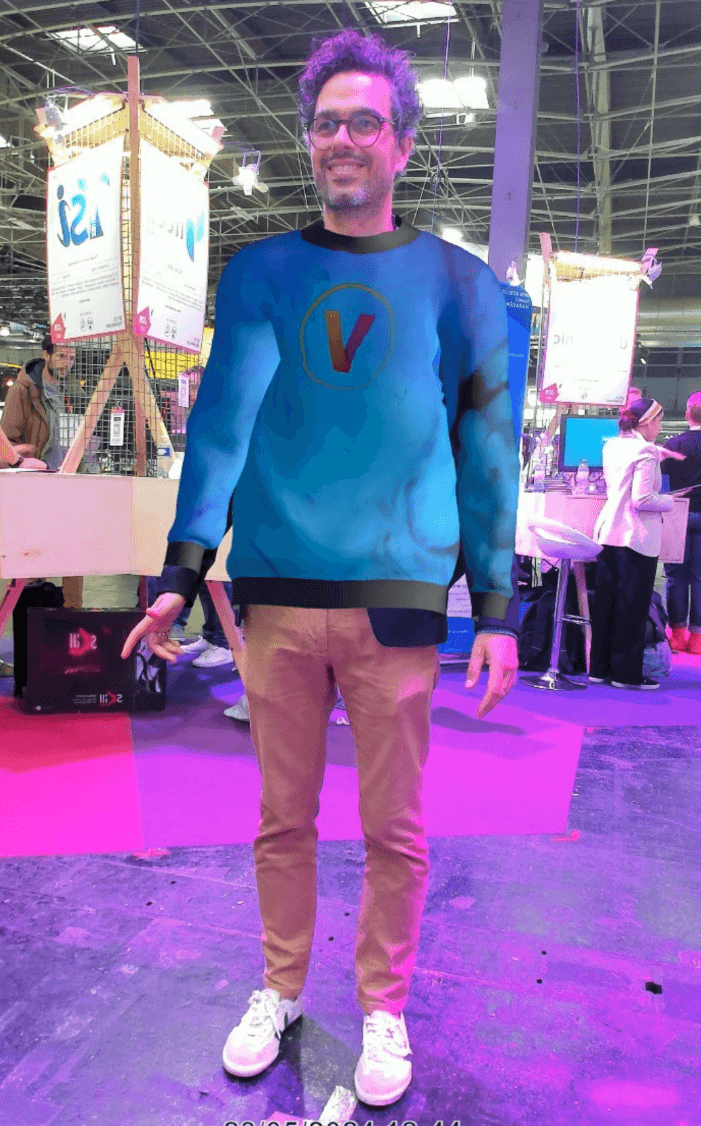
In augmented reality, the garment exists before the visitor arrives: it is a 3D model, usually a glTF file, with an internal skeleton (it is rigged). In every frame, the software aligns that skeleton with the visitor’s keypoints and the 3D engine, three.js in a browser for example, draws the garment over the camera image. Secondary animation makes a cape or a skirt swing; the person mask hides what should pass behind an arm; the lighting is adjusted to the scene.
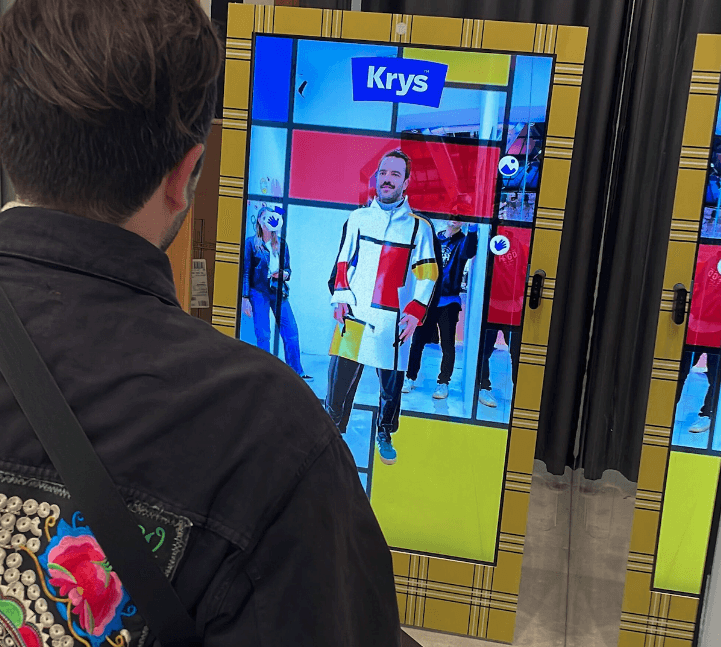
The strength of this approach is fidelity: the garment is the product, with its exact colours, logos and patterns, since they come from its 3D model. It responds instantly, runs entirely on the kiosk, and the same skeleton drives games and gestures. Its limit is the fabric: a 3D garment follows the body but only approximates how cloth drapes and folds. And every new look starts with a 3D model to build or adapt. A cheaper variant pins a flat 2D image of the product to the keypoints: quick to produce, convincing face-on, less so when the visitor turns.
This is the family behind most of our projects: co-branded Superman outfits at Celio, historical uniforms at the Musée de La Poste, 3D outfits in Westfield shopping centres, lab coats and costumes on a Sanofi stand at a dermatologists’ congress.
Dressing the visitor with generative AI
Generative AI reverses the logic: the garment is not placed on the image, the image is redrawn with the garment. Two very different products come out of it.
Try-on from a photo. The mirror takes a picture; an image model receives the photo and a picture of the garment and generates the visitor wearing it. Since 2024, research models such as IDM-VTON, OOTDiffusion or CatVTON have made this kind of rendering convincing: folds, light and the way fabric falls look right, from a simple product photo, with no 3D modelling. Their code is public, but licensed for non-commercial use only: a commercial mirror relies on a licensed model or service. But it is a still image, produced after a short wait: perfect for a souvenir, not for a mirror you move in front of.
Try-on from a photo at Google: the visitor’s own picture, dressed by a generative model in the chosen garment.
Video: Google, on YouTube.Try-on on live video. The latest step is video models fast enough to transform a camera stream as it plays. Research has been closing the gap since StreamDiffusion, which transformed images at up to 91 per second on a single RTX 4090 graphics card in late 2023, and the 2025 work on generating video as a continuous stream with under a second of latency. The kiosk sends its stream to a GPU in the cloud, the model redraws every frame in the chosen outfit, and the transformed video comes back to the screen. The visitor moves, turns, raises an arm, and the fabric follows. A new outfit only needs a product photo or a sentence, and the same mirror can turn a visitor into a costume or a character.
A live try-on shown on stage at SIGGRAPH Asia 2024: the camera image is redrawn in real time wearing the garment. This research prototype trains one generative network per garment rather than using a video diffusion model, but the experience is the same: you move, and the garment follows.
Video: Zaiqiang Wu, on YouTube.The limits are as real as the effect. The model interprets the garment: a logo or a fine pattern can come out approximate. It has to stay consistent from one frame to the next. It needs a fast, stable connection, since every frame travels back and forth. Every minute of use costs GPU time. And the video leaves the kiosk, which changes the privacy question.
Five steps, three ways to dress the visitor
-
1Capture
Augmented reality
On the kiosk
A standard camera films the visitor continuously.
AI, photo
On the kiosk
The camera takes one photo once the visitor is in position.
AI, live video
On the kiosk
The camera stream leaves the kiosk continuously.
-
2Detect
Augmented reality
On the kiosk
Motion or person detection wakes the mirror from its attract loop.
AI, photo
On the kiosk
Motion or person detection wakes the mirror from its attract loop.
AI, live video
On the kiosk
Motion or person detection wakes the mirror and opens the video session.
-
3Understand
Augmented reality
On the kiosk
A pose model finds the skeleton in every frame.
AI, photo
In the cloud
The try-on model reads the body, the pose and the garment from the photo.
AI, live video
In the cloud
The video model reads the body and its movement in every frame.
-
4Render
Augmented reality
On the kiosk
three.js draws the 3D garment on the skeleton, over the camera image.
AI, photo
In the cloud
An image model paints the garment onto the photo, after a short wait.
AI, live video
In the cloud
The model redraws every frame in the outfit and streams the video back.
-
5Share
Augmented reality
In the cloud
The photo or clip is uploaded; a QR code lets the visitor keep it.
AI, photo
In the cloud
The picture is shown, then shared by QR code.
AI, live video
In the cloud
A clip of the session is saved and shared by QR code.
Everything that looks at the body stays on the kiosk. At 30 frames per second, each frame has 33 milliseconds to be analysed and drawn; only the souvenir leaves the kiosk.
The visitor waits for one image instead of watching themselves move: a good fit for a souvenir photo, not for a live mirror.
Every frame travels to a GPU and back: the network matters as much as the model.
The five steps every magic mirror runs, capture, detect, understand, render, share, for three approaches: augmented reality, AI from a photo, AI on live video. Each step says what it does and whether it runs on the kiosk or in the cloud.
Where each step runs is what separates the approaches, as much as the rendering itself.
How to choose
| 2D overlay | 3D AR, standard camera | 3D AR, depth camera | AI try-on, photo | AI try-on, live video | |
|---|---|---|---|---|---|
| Live | Yes | Yes | Yes | No | Yes |
| Exact product | Yes, flat | Yes | Yes | Interpreted | Interpreted |
| Drape and light | No | Approximated | Approximated | Photorealistic | Photorealistic |
| A new look needs | A product picture | A 3D model | A 3D model | A product picture | A product picture or a sentence |
| Network | Standard | Standard | Standard | Needed for each photo | Fast and stable |
| Cost per use | None | None | None | Per image | Per minute |
The right approach depends on what the activation has to achieve. A retailer who wants visitors to see its exact product and play with it for several days will choose 3D AR. A brand launching a collection that wants the wow effect and a video that gets shared will choose live AI. Many activations combine them: AR games during the day, an AI moment on the opening night.
Which approach for which activation
No approach does all of that: untick one need.
-
2D overlay on the skeleton
A flat picture of the product pinned to the keypoints. Quick to produce, but it does not turn with the body.
- To see yourself move, live
- The exact product (logos, patterns)
- New looks without 3D modelling
- To work on a weak connection
- Body games and gestures
- Glasses, make-up, hats
- A standard camera
- No computing cost per use
-
3D AR, standard camera
A 3D garment rigged to a skeleton estimated from a webcam and drawn in real time. ARGO’s AR mode.
- To see yourself move, live
- The exact product (logos, patterns)
- To work on a weak connection
- Body games and gestures
- Glasses, make-up, hats
- A standard camera
- No computing cost per use
-
3D AR, depth camera
The same rendering with a depth sensor and its body-tracking software: sturdier tracking, dearer hardware, native software.
- To see yourself move, live
- The exact product (logos, patterns)
- To work on a weak connection
- Body games and gestures
- Real depth (crowds, tricky light)
- No computing cost per use
-
AI try-on, photo
An image model dresses a photo of the visitor from a product picture. Photorealistic, but not live.
- Photorealistic drape and light
- New looks without 3D modelling
- A standard camera
-
AI try-on, live video
A video model redraws the visitor frame by frame in the chosen outfit. ARGO’s generative AI option.
- To see yourself move, live
- Photorealistic drape and light
- New looks without 3D modelling
- A standard camera
Tick what your activation needs; the list keeps the approaches that do all of it, among five: 2D overlay on the skeleton, 3D AR with a standard camera, 3D AR with a depth camera, AI try-on from a photo, AI try-on on live video.
Each approach is shown with what it does in its usual setup: a photo try-on model can run on a local GPU, for example, but is normally served from the cloud.
Privacy
A magic mirror films people, so the question comes up in every project. In augmented reality, the image is analysed on the kiosk: the skeleton is computed for each frame and immediately discarded, and nothing is used to recognise anyone. The GDPR’s biometric data is defined by its purpose: data from specific technical processing that allows or confirms the unique identification of a person. A mirror that places a jacket on a pair of shoulders does not identify anyone. The CNIL makes the same distinction for the ‘augmented cameras’ that analyse people in shops: they are not biometric recognition, but they still raise their own questions, above all of information and of the right to object.
With generative AI, the video leaves the kiosk to be transformed in the cloud. That calls for a clear notice next to the mirror, a provider bound by a data processing agreement, and a short retention period for the clips that visitors take away. In both cases, the photo or video that a visitor keeps through a QR code is personal data, to be handled as such.
At ARGO
Our Magic Mirror runs on a standard camera, AI pose estimation and three.js in a web browser: 3D garments rigged to the skeleton, a photobooth with backgrounds, body games, and a QR code to keep the souvenir. It now also offers, as an option, live generative AI try-on: the visitor sees themselves redrawn in the outfit, and leaves with the video.
The mirror arrives configured and is set up in under two hours. It has been deployed for Westfield, Celio, the Musée de La Poste, Sanofi, Krys and the CAPEB stand at WorldSkills in Lyon. To see both modes, AR and AI, in front of your own products: discover the Magic Mirror.
FAQ